Dell Inspiron 14 5410 2 / 7415 2-in-1 Internal Laptop Speaker – Part No 8TP3F
Product Description
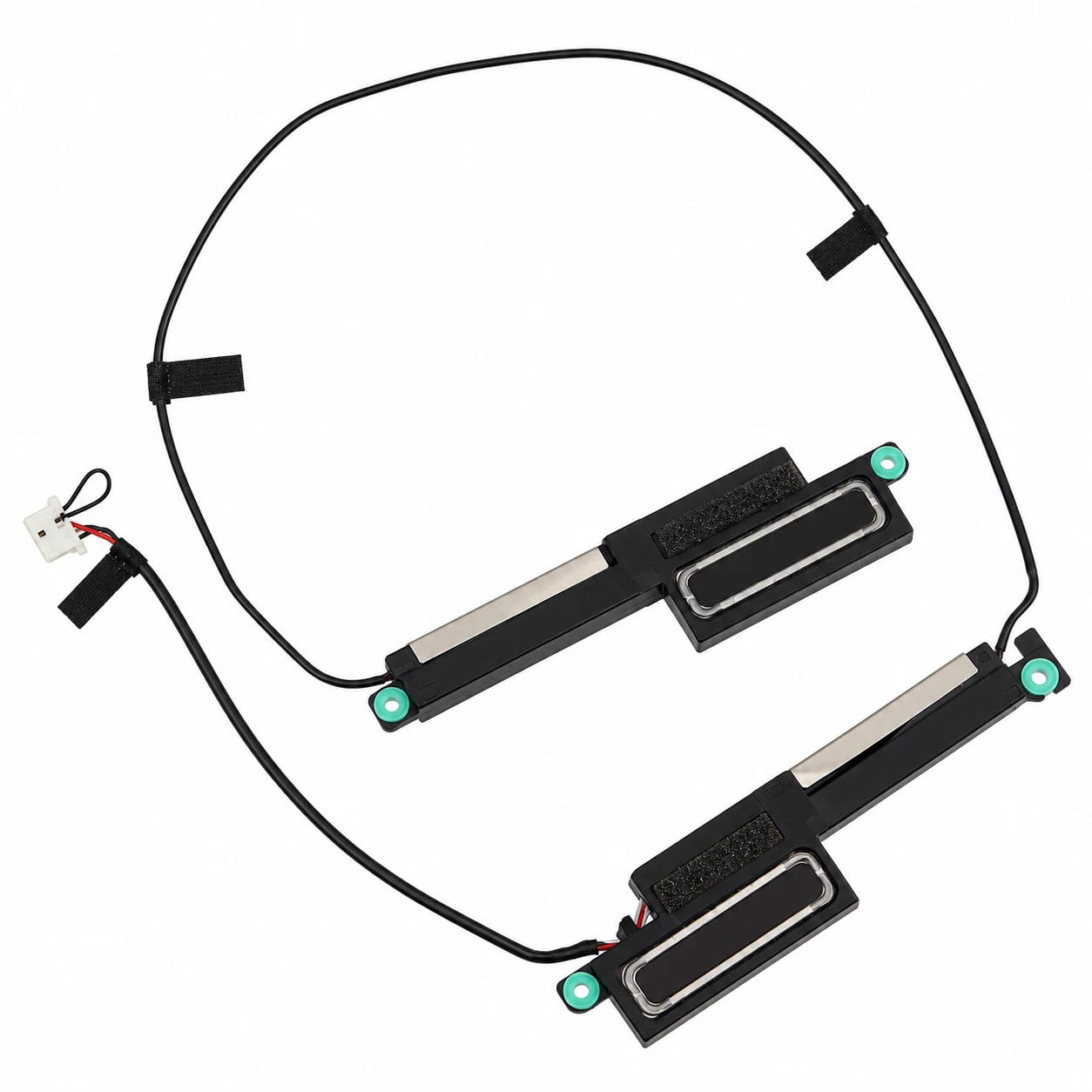
Buy a compatible internal laptop speaker assembly for Dell Inspiron 14 5410 2-in-1 and Dell Inspiron 7415 2-in-1 laptops from LaptopHub. This replacement speaker set is designed for compatible Dell convertible laptops experiencing low sound, distorted audio, crackling noises, or no sound from the built-in speakers.
The internal speaker assembly delivers audio for music, videos, online meetings, video calls, notifications, and everyday laptop activities. If the original speakers become faulty or physically damaged, replacing the speaker assembly may help restore normal audio output.
This product is identified by Dell part number 8TP3F, also known as 08TP3F and CN-08TP3F. It is the left-and-right speaker assembly specified for the 4-cell battery configuration of the Dell Inspiron 14 5410 2-in-1 and Inspiron 7415 2-in-1.
Important: These laptop models were available with different battery configurations. The 4-cell battery version uses speaker part number 8TP3F, whereas the 3-cell battery version uses H0C29. Always compare the original part number and battery configuration before purchasing.
Compatible Models
The following models are compatible with the 8TP3F speaker assembly when equipped with a 4-cell battery:
- Dell Inspiron 14 5410 2-in-1 – 4-cell battery version
- Dell Inspiron 7415 2-in-1 – 4-cell battery version
Not compatible by default: The 3-cell battery versions use a different speaker assembly, identified by part number H0C29.
Compatible Part Numbers
- 8TP3F
- 08TP3F
- CN-08TP3F
- 023.400NM.0001
- 023.400NM.0011
Check the markings on your original speaker assembly before ordering. Part-number variations should be verified against the physical component.
Product Details
- Product Category: Laptop Spare Parts
- Product Name: Internal Laptop Speaker Assembly
- Compatible Brand: Dell
- Compatible Models: Dell Inspiron 14 5410 2-in-1 and Inspiron 7415 2-in-1
- Part Number: 8TP3F
- Alternate Part Number: 08TP3F
- Additional Identification: CN-08TP3F
- Compatible Assembly Numbers: 023.400NM.0001, 023.400NM.0011
- Battery Configuration: 4-cell battery version
- Product Condition: New compatible replacement
- Speaker Type: Internal laptop speakers
- Speaker Configuration: Left and right speaker assembly
- Audio Output: Stereo
- Installation Location: Inside laptop chassis
- Main Function: Produces audio through the laptop’s built-in speaker system
- Package Contents: Left and right internal speaker assembly
- Installation: Professional installation recommended
Common Problems This Speaker Can Help Resolve
A faulty internal speaker assembly may cause the following problems:
- No sound from the laptop’s built-in speakers.
- Crackling or buzzing noises during audio playback.
- Distorted sound while watching videos or listening to music.
- Low speaker volume despite correct sound settings.
- One speaker working while the other speaker remains silent.
- Intermittent audio output from the internal speaker system.
- Physical damage to the original speaker or its connecting wires.
These symptoms can also result from faulty audio drivers, loose speaker connectors, or motherboard audio circuitry. Check the complete audio system before replacing the speaker assembly.
Installation Guidance
- Shut down the laptop completely and disconnect the charger.
- Open the laptop using the correct model-specific service procedure.
- Disconnect the internal battery before handling the speaker assembly.
- Locate and carefully remove the original left and right speakers.
- Compare the replacement speaker with the original connector, wiring, dimensions, and mounting positions.
- Install the replacement assembly without forcing connectors or trapping cables.
- Reassemble the laptop and test both speakers.
Professional installation is recommended to avoid damage to the motherboard, internal cables, connectors, or laptop casing.
Warranty Details
1 Month Replacement Warranty against verified eligible manufacturing or functional defects, subject to LaptopHub’s applicable replacement terms.
Physical damage, accidental damage, burns, cuts, misuse, installation damage, and missing or damaged warranty stickers or labels are excluded.
Important Note
- Confirm your complete Dell laptop model before placing an order.
- This 8TP3F speaker assembly is intended for the 4-cell battery configuration.
- The 3-cell battery version uses a different speaker assembly, H0C29.
- Compare the original speaker part number with 8TP3F or 08TP3F.
- Check the connector, cable arrangement, speaker dimensions, and mounting points.
- Confirm that the package contains the left and right speaker assembly.
- Do not purchase based only on the laptop model name.
- Using an incompatible speaker assembly may cause installation problems or damage internal components.
- Professional installation is recommended.
- If the product is out of stock, your payment will be refunded according to the applicable order process.
- Replacement for verified functional issues is subject to the applicable warranty terms.
- Warranty does not cover external causes, accidents, physical damage, cuts, burns, misuse, or missing or damaged warranty stickers and labels.
- Ensure your delivery address includes the correct PIN code and contact number.
- Product images are for reference; the supplied product may differ slightly in appearance.
Frequently Asked Questions
1. Is the 8TP3F speaker compatible with Dell Inspiron 14 5410 2-in-1?
Yes, the 8TP3F speaker assembly is listed for the Dell Inspiron 14 5410 2-in-1 with a 4-cell battery. Check your original speaker part number before ordering.
2. Does this speaker also support Dell Inspiron 7415 2-in-1?
Yes, the 8TP3F speaker assembly is also listed for the Dell Inspiron 7415 2-in-1 with a 4-cell battery configuration.
3. What is the difference between 8TP3F and H0C29?
8TP3F is the speaker assembly for the 4-cell battery version, while H0C29 is for the 3-cell battery version. These assemblies should not be treated as interchangeable.
4. Does this product include both left and right speakers?
The 8TP3F part number identifies a left-and-right speaker assembly. Verify the supplied package contents before placing your order.
5. Does this Dell speaker assembly come with a warranty?
The product includes a 1 Month Replacement Warranty against verified eligible functional defects, subject to LaptopHub’s applicable replacement terms and exclusions





Reviews
There are no reviews yet.