DC Power Jack for Dell Precision 7510 M7510 P53F AAPA0 GSAD3 0MH9GW Laptop
Product Description
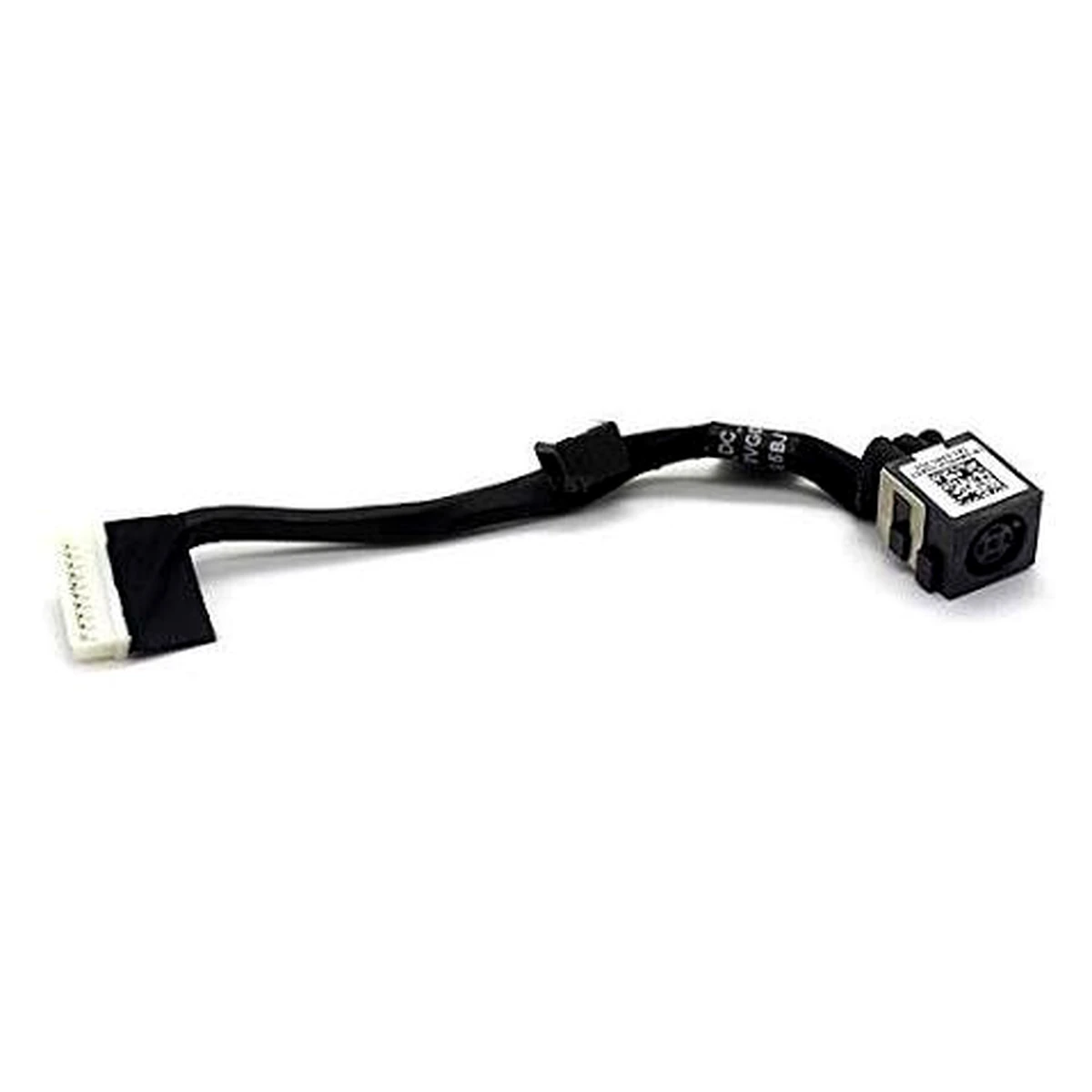
The DC Power Jack for Dell Precision 7510 M7510 is a replacement laptop charging port assembly designed to restore reliable power connectivity and charging functionality. This DC-IN power connector comes with a connecting cable that links the laptop’s charging socket to the motherboard’s internal power circuit.
Compatible with Dell Precision 7510 workstation laptops, this replacement DC charging jack is associated with part number 0MH9GW (MH9GW), AAPA0 DC-IN Cable and DC30100VD00. It is designed for replacing a damaged, loose, worn-out or faulty charging port that prevents the laptop from receiving a stable power supply.
A defective DC Power Jack can cause intermittent charging, loose adapter connections, charging interruptions, adapter detection problems or complete loss of power connectivity. Replacing the faulty connector may restore normal charging operation without requiring a complete motherboard replacement, provided the issue is limited to the DC-IN assembly.
This replacement charging port is suitable for laptop repair technicians, professional service centres and users looking for a compatible power connector for Dell Precision mobile workstations.
Compatible Laptop Models
- Dell Precision 7510
- Dell Precision 15 7510
- Dell Precision M7510
- Dell Precision P53F
- Dell Precision 7520 (verify original connector before ordering)
Compatible Part Numbers
- 0MH9GW
- MH9GW
- AAPA0
- GSAD3
- DC30100VD00
- DC30100VG00
Product Details
| Specification |
Details |
| Product Type |
DC Power Jack with Cable |
| Brand Compatibility |
Dell |
| Laptop Series |
Precision |
| Compatible Model |
Precision 7510 |
| Model Number |
M7510 |
| Regulatory Model |
P53F |
| Part Number |
0MH9GW / MH9GW |
| Additional Identification |
AAPA0 / GSAD3 |
| Cable Part Number |
DC30100VD00 |
| Component Type |
DC-IN Power Connector |
| Main Function |
Power Input and Charging |
| Connection Type |
Cable with Motherboard Connector |
| Installation |
Internal Laptop Component |
| Application |
Charging Port Replacement |
| Product Condition |
Replacement Spare Part |
Key Features and Benefits
- Reliable Charging Connection: Provides a power connection between the compatible AC adapter and laptop motherboard.
- DC-IN Cable Assembly: Includes the charging connector and connecting cable for internal power connectivity.
- Replacement Solution: Suitable for replacing a damaged, loose or faulty original DC charging port.
- Model Compatibility: Designed for Dell Precision 7510 M7510 P53F workstation laptops.
- Multiple Part Number Identification: Associated with MH9GW, 0MH9GW, AAPA0 and DC30100VD00.
- Power Connectivity Restoration: Helps resolve charging interruptions caused by a defective DC-IN connector.
- Professional Repair Application: Suitable for laptop repair shops, technicians and workstation maintenance services.
Common Symptoms of a Faulty DC Power Jack
- Laptop Not Charging: The laptop fails to receive power when the AC adapter is connected.
- Loose Charging Port: The charger plug does not fit securely into the charging socket.
- Intermittent Charging: Charging repeatedly disconnects and reconnects.
- Charging Angle Problem: The laptop charges only when the adapter is positioned at a particular angle.
- Adapter Detection Issues: The laptop does not consistently recognise the connected power adapter.
- Damaged DC Connector: The charging socket becomes physically loose, broken or worn out.
- Unexpected Power Disconnection: The laptop loses its power connection when the charger cable moves.
These symptoms may also be caused by a defective adapter, battery or motherboard charging circuit. Proper diagnosis is recommended before replacing the DC jack.
Installation and Replacement Information
- Turn off the Dell Precision laptop completely.
- Disconnect the AC power adapter.
- Remove the laptop’s bottom cover carefully.
- Disconnect the internal battery before handling the charging connector.
- Locate the existing DC-IN power jack assembly.
- Compare the original connector with the replacement part.
- Check the cable length, connector shape and motherboard pin arrangement.
- Disconnect the old DC-IN cable carefully.
- Install the replacement power jack and route its cable correctly.
- Reassemble the laptop and test power connectivity and charging functionality.
Professional installation is recommended to prevent motherboard damage, cable damage or electrical short circuits.
Warranty Details
- 1 Month Replacement Warranty.
- Warranty applies to functional issues subject to the stated warranty conditions.
Important Note
- Please compare the product with the provided image before placing your order.
- Verify the original part number, connector shape, cable length and pin configuration.
- Screws are not included.
- Confirm compatibility with your exact laptop model before ordering.
- Installing an incompatible part may damage your laptop.
- If the product is out of stock, your payment will be refunded.
- Immediate replacement is available for functionality-related problems.
- Warranty will be void in case of physical damage at the time of replacement.
- External damage, accidental damage, cuts, burns, misuse, and missing warranty stickers or labels are not covered.
- Please record an unboxing video when opening your package for any replacement claim.
Frequently Asked Questions
Q1. Is this DC Power Jack compatible with Dell Precision 7510 M7510?
Yes, this DC Power Jack is designed for Dell Precision 7510 M7510 laptops. Verify the original connector and part number before ordering.
Q2. What are the compatible part numbers for this Dell Precision charging port?
The associated part numbers include 0MH9GW, MH9GW, AAPA0 and DC30100VD00. DC30100VG00 is also used as an associated reference, but the physical connector must be checked.
Q3. Does this DC Power Jack include a connecting cable?
Yes, this is a DC-IN power jack assembly with a connecting cable for internal motherboard power connectivity.
Q4. Can this replacement fix charging problems on Dell Precision 7510?
Yes, if the charging issue is caused by a damaged or defective DC Power Jack. A faulty charger, battery or motherboard circuit may require separate diagnosis.
Q5. Is this DC Power Jack compatible with Dell Precision 7520?
Some listings associate the MH9GW assembly with both Precision 7510 and 7520. However, connector revisions may differ, so compare your original assembly before ordering



Reviews
There are no reviews yet.