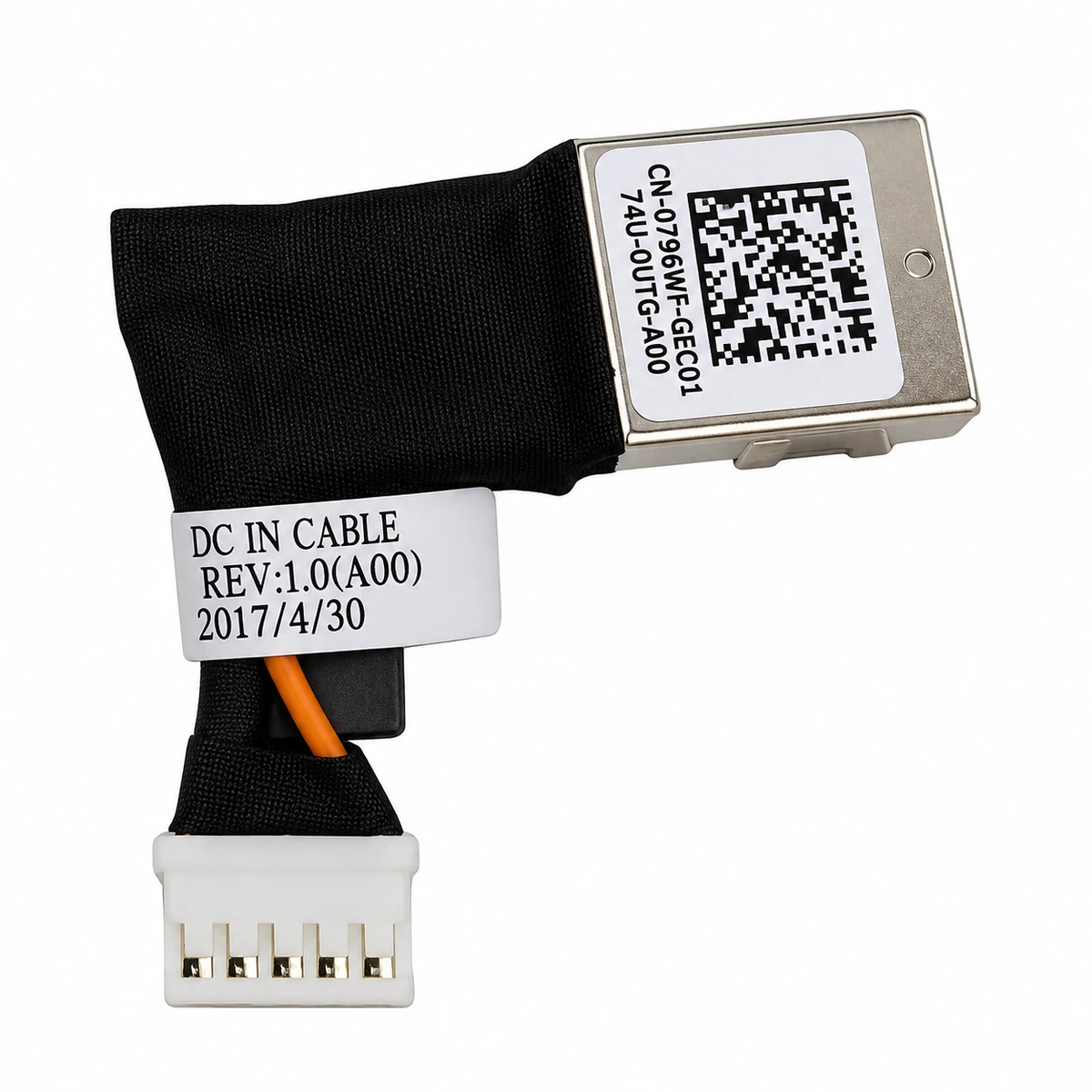
DC Power Jack for Dell Latitude E5270 P23T ADM60 DC30100VT00 0769WT 769WT
Product Description
The DC Power Jack for Dell Latitude E5270 is a replacement laptop charging connector designed to restore reliable power connectivity and charging functionality. Compatible with Dell Latitude E5270 P23T ADM60 configurations, this DC charging port provides the connection between the laptop’s compatible AC power adapter and internal power circuit.
A damaged, loose or faulty DC Power Jack can cause several charging-related problems, including intermittent charging, adapter connection issues, unstable power supply and difficulty charging the laptop battery. Replacing the defective charging connector can help restore normal power connectivity when the original DC jack is responsible for the problem.
This replacement DC charging port is associated with part numbers DC30100VT00, 0769WT and 769WT. It is suitable for laptop repair technicians, computer service centres and users looking for a replacement charging connector for their Dell Latitude E5270 laptop.
Whether your original charging port has become loose, physically damaged or stopped maintaining a proper connection with the charger, this replacement component offers a practical laptop repair solution without necessarily replacing the entire motherboard.
Compatible Laptop Models
- Dell Latitude E5270
- Dell Latitude P23T Series
- Dell Latitude E5270 ADM60 Configuration
Compatible Part Numbers
- DC30100VT00
- 0769WT
- 769WT
- ADM60
- P23T
Product Details
| Specification |
Details |
| Product Type |
DC Power Jack |
| Brand Compatibility |
Dell |
| Laptop Series |
Latitude |
| Compatible Model |
E5270 |
| Model Identification |
P23T |
| Additional Identification |
ADM60 |
| Part Number 1 |
DC30100VT00 |
| Part Number 2 |
0769WT |
| Part Number 3 |
769WT |
| Component Category |
Power & Charging Connector |
| Main Function |
DC Power Input |
| Application |
Laptop Charging Port Replacement |
| Installation Type |
Internal Laptop Component |
| Product Condition |
Replacement Spare Part |
Key Features and Benefits
- Reliable Power Connectivity: Provides a connection between the compatible laptop charger and internal power system.
- Replacement Charging Connector: Suitable for replacing a damaged, loose or defective DC charging jack.
- Model-Specific Application: Intended for Dell Latitude E5270 P23T ADM60 configurations.
- Part Number Identification: Associated with DC30100VT00, 0769WT and 769WT.
- Charging Problem Repair: Can help resolve charging interruptions caused by a faulty DC Power Jack.
- Motherboard Repair Alternative: May eliminate the need for motherboard replacement when the fault is limited to the charging connector.
- Professional Repair Application: Suitable for laptop technicians, service centres and spare-parts suppliers.
Common Symptoms of a Faulty DC Power Jack
- Laptop Not Charging: The laptop does not receive power when the compatible charger is connected.
- Loose Charging Port: The charger plug does not fit securely into the DC charging socket.
- Intermittent Charging: Charging repeatedly connects and disconnects.
- Charging Angle Problem: The laptop charges only when the adapter is held at a particular angle.
- Power Connection Failure: The laptop does not consistently detect the connected AC adapter.
- Physical Connector Damage: The charging port becomes loose, broken or visibly damaged.
- Unstable Power Supply: The laptop experiences interruptions in power delivery due to a defective connector.
Note: Similar symptoms can also result from a faulty AC adapter, battery, motherboard or charging circuit. Proper diagnosis is recommended before replacing the DC jack.
Installation and Replacement Information
- Switch off the laptop completely before starting the repair.
- Disconnect the AC power adapter and internal battery.
- Carefully remove the laptop’s bottom cover.
- Locate the existing DC Power Jack assembly.
- Inspect the original connector and compare it with the replacement.
- Check the cable length, connector shape and pin configuration.
- Carefully disconnect the old DC jack from the motherboard.
- Install the compatible replacement charging connector.
- Reassemble the laptop and test charging and power connectivity.
Professional installation is recommended to prevent accidental motherboard damage, cable damage or electrical short circuits.
Warranty Details
- 1 Month Replacement Warranty.
- Warranty applies to functional issues subject to the stated warranty conditions.
Important Note
- Please compare the product with the provided image before placing your order.
- Verify the original part number, connector shape and cable configuration before purchasing.
- Screws are not included.
- Confirm compatibility with your exact laptop model before ordering.
- Installing an incompatible part may damage your laptop.
- If the product is out of stock, your payment will be refunded.
- Immediate replacement is available for functionality-related problems.
- Warranty will be void in case of physical damage at the time of replacement.
- External damage, accidental damage, cuts, burns, misuse, and missing warranty stickers or labels are not covered.
- Please record an unboxing video when opening your package for any replacement claim.
Frequently Asked Questions
Q1. Is this DC Power Jack compatible with Dell Latitude E5270?
Yes, this replacement DC Power Jack is listed for Dell Latitude E5270. Please compare the original charging connector before ordering.
Q2. What are the compatible part numbers for this Dell Latitude E5270 charging port?
The associated part numbers are DC30100VT00, 0769WT and 769WT. Always verify the original part number and physical connector.
Q3. Can this DC Power Jack fix charging problems on Dell Latitude E5270?
Yes, if the charging problem is caused by a damaged or faulty DC charging connector. Other power components may require inspection if the issue continues.
Q4. Does this charging connector support Dell Latitude P23T ADM60?
It is listed for Dell Latitude E5270 P23T ADM60 configurations. Check the original connector and cable arrangement to confirm compatibility.
Q5. Is professional installation recommended for this DC Power Jack?
Yes, professional installation is recommended because the charging connector is an internal laptop component that requires careful handling.



Reviews
There are no reviews yet.